Reading time: 10 minutes
MCP for SEO and marketing connects an AI assistant, such as Claude, to GA4 or Semrush through a standard MCP server. The assistant then queries that data directly. But each connection widens what the model can read and do with client data.
In short
- MCP (Model Context Protocol) is an open standard that connects AI applications to external systems. Today, MCP for SEO and marketing already has servers for GA4, Google Ads, Semrush and Ahrefs.
- Each server exposes tools (actions), resources (read-only data) and prompts (instruction templates), and the AI application creates one client for each.
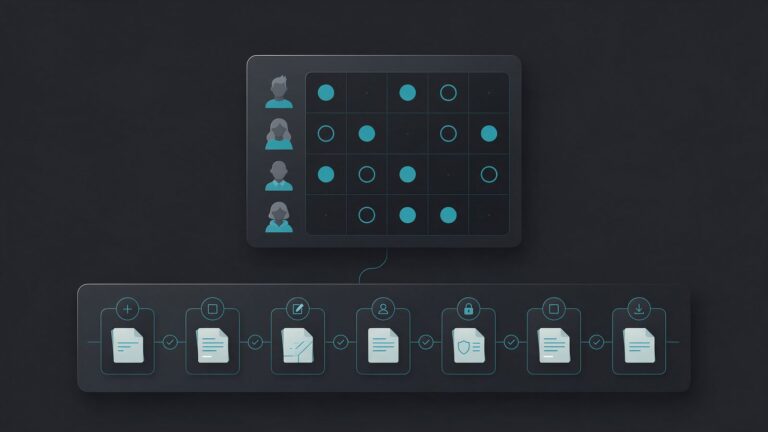
- The real risks are overly broad permissions, client data passing through the model and prompt injection in external content.
- To start, use an official MCP server, preferably remote and read-only, and read the tool list before you ask for anything.
What is MCP and what is it for in SEO?
MCP (Model Context Protocol) is an open standard for connecting AI applications to external systems, such as files, databases and tools. In SEO and marketing, MCP lets Claude or another assistant query GA4 or Semrush directly, without exporting spreadsheets. According to the official documentation, MCP works like a USB-C port for AI applications.
Anthropic introduced the standard in late 2024. In December 2025, it donated MCP to the Agentic AI Foundation, part of the Linux Foundation. Also, according to the company, ChatGPT, Cursor, Gemini, Microsoft Copilot and Visual Studio Code had already adopted MCP. Therefore, one MCP server can serve several assistants.
However, it helps to know what MCP does not do. According to the architecture page, it defines only the exchange of context and does not dictate how the application uses the model. So the quality of the analysis depends on the model and on your request.

How does MCP work: clients, servers, tools and resources?
MCP for SEO follows the client-server architecture of the protocol. The host is the AI application of the marketing team (for example, Claude Code). It creates one MCP client for each connected server. In other words, the MCP server is the program that provides the context. Then the client discovers what the server offers and passes it to the host.
The server runs in two ways, depending on the transport. With stdio, it is a local process on your machine and usually serves a single client. With Streamable HTTP, however, it is remote, serves many clients and accepts tokens, API keys or custom headers. Even so, the documentation recommends OAuth to obtain the tokens.
In the current version of the specification, 2026-07-28, the protocol is stateless. That is, each request carries the version and the capabilities of the client. So the server/discover call is optional.
What does an MCP server expose: tools, resources and prompts?
According to the server documentation, a server offers three building blocks, and each has a different owner:
| Block | What it is | Who controls it |
|---|---|---|
| Tools | Functions the model calls, such as querying an API or creating a record | The model |
| Resources | Read-only data, such as schemas, documents and API responses | The application |
| Prompts | Ready-made instruction templates, such as “summarize my meetings” | The user |
So the model decides when to call each tool, and to do that it reads the tool’s name and description. The snippet below shows the format defined by the specification (name, description and inputSchema). It is an example we made up, and it does not belong to any real server:
{
  "name": "get_rankings",
  "description": "Returns the organic rankings of a domain for a country.",
  "inputSchema": {
    "type": "object",
    "properties": {
      "domain": { "type": "string", "description": "Domain, such as example.com" },
      "country": { "type": "string", "description": "Country code, such as us" }
    },
    "required": ["domain", "country"]
  }
}
Because the model reads the description as an instruction, it comes back in the risks section.
What examples of MCP for SEO and marketing already exist?
SEO and marketing data vendors already publish MCP servers: Google Analytics, Google Ads, Semrush and Ahrefs each have one. For Search Console, however, we did not find a server published by Google, and the ones we found come from third parties. Here is what the official documentation says:
- Google Analytics: the server is local and experimental. It has tools such as
run_reportandrun_realtime_report, and the credential asks for theanalytics.readonlyread scope. However, thecreate_property_annotationtool only works with the--allow-writeflag and the edit scope. - Google Ads: the server has the tools
search,get_resource_metadataandlist_accessible_customers. The README warns that it exposes the account data to the connected agent or model. - Semrush: the documentation describes a remote server that uses only Streamable HTTP, with OAuth by default. It covers the SEO and Trends APIs and the read methods of the Projects API, so it uses the API units of your plan.
- Ahrefs: the server is hosted and requires the Lite plan or higher. Also, each OAuth connection creates a key with MCP scope and a default limit of 200,000 units per month.
Without MCP, the path for Search Console is to export the CSV, as the guide to analyzing Search Console with AI shows. On the other hand, the guide to Claude Code for SEO and GEO explains the MCP option and its precautions.
What should you ask an SEO data server?
MCP in marketing works best for exploration questions, when you do not yet know which report to open. The Semrush documentation suggests, for example, listing domains in an industry and tracking ranking drops daily. On the other hand, the GA4 one suggests asking which events happened most in the last 180 days.
So, because the host keeps one client per server, a single conversation can combine sources. For example, the assistant can read sessions in GA4 and rankings in Semrush, then point out pages that lost in both. Even so, check the result in the source dashboard, because Semrush warns that AI responses may be incomplete.
MCP, API, skill or CSV: which one to use?
Use MCP for SEO and marketing when the question changes with each request and you want current data. However, for a task that repeats the same way, a fixed automation usually works better. A skill, on the other hand, connects nothing: it only tells the assistant what to do. The table summarizes the choice:
| Path | When to use | Limit |
|---|---|---|
| MCP | Exploration with live data | The model chooses the calls |
| Export CSV | One-off analysis, no live access | Static data and a row limit |
| Fixed workflow (n8n) | Report that runs the same way every month | You must build and maintain the workflow |
| Direct API | Deterministic collection at volume | Requires code |
The difference shows in the Semrush documentation. Skills are instructions that tell the agent which tools to call, in what order and how to interpret the result. In other words, the two complement each other. The guide to n8n for SEO and GEO covers the fixed workflow, while the guide to AI for SEO and GEO compares all the paths.
But there is a usage rule. Ahrefs says that using the MCP endpoint through your own scripts, bridges or standalone HTTP clients is not allowed. It points to the public API in those cases. So read each vendor’s terms before you automate.
What are the risks of MCP for SEO: permissions, client data and prompt injection?
The three risks of MCP for SEO are overly broad permissions, client data that passes through the model and prompt injection. Each one needs its own control, but the tools specification gives a basic rule:
“For trust & safety and security, there SHOULD always be a human in the loop with the ability to deny tool invocations.”
MCP specification, version 2026-07-28
So the client should show the tools the model receives and ask for confirmation on sensitive operations.
Permissions: what can the server touch?
The documentation on local server security is direct: a local server does not run in a sandbox that the protocol provides. It is, in fact, an ordinary process that inherits your environment variables and reads whatever your account reads. So the recommendation is to prefer the remote version when one exists.
For each server, reduce the reach:
- Read first: in GA4, keep only the
analytics.readonlyscope and leave the--allow-writeflag off. - One credential per client, with only the needed scopes: that way, a leaked key does not open the data of other accounts.
- A short list of servers: all of them share the same model context, and a malicious server can influence the tools of the others.
Client data and prompt injection
Everything a tool returns enters the model’s context. So, in MCP for marketing, client data also passes through the data policy of the AI application, not only through that of the server vendor. In fact, the Google Ads README says this plainly: the server exposes your data to the connected agent. So check the plan’s policy before you open a client’s account.
Prompt injection is the other risk, because external text also enters the context. So the Claude Code documentation warns that servers that fetch external content can expose you to this attack. For example, imagine a tool that reads competitor pages. The page text goes into the context, and a hidden instruction there can change the model’s behavior.
There is, however, another variant, called tool poisoning in the MCP documentation. Tool names and descriptions are instructions the model reads, and a server can hide orders there, even changing them after you approve it. So read the tool list before you use it. The MCP Inspector, the official testing tool, helps with this because it shows each tool without a model in the middle.
How do you start using MCP for SEO safely?
First, to use MCP for SEO, start with an official MCP server, preferably remote, in read mode, on a single project. In Claude Code, the claude mcp add command registers the server and the /mcp command handles authentication. Follow these steps:
- Choose the server: use the vendor’s own (GA4, Google Ads, Semrush or Ahrefs) and check the plan it requires.
- Set the scope: the local scope, which is the default, keeps the configuration only with you. The project scope writes an
.mcp.jsonfor the whole team, so use environment variables for the keys. - Register the server: run the command below, replacing the name and the URL with the vendor’s.
- Authenticate: open
/mcpin Claude Code and follow the browser login. Then the panel shows the tool count of each server. - Restrict: deny the tools that write and allow only the read ones.
- Test: ask a question whose answer you can check in the original dashboard.
How do you register and restrict the server in Claude Code?
We tested the command below on Claude Code 2.1.312, in a temporary folder, with the fictional URL https://example.com/mcp. It generated the file shown next. We did not test the connection or the login, because they require the vendor’s account:
claude mcp add --transport http example https://example.com/mcp --scope project{
"mcpServers": {
"example": {
"type": "http",
"url": "https://example.com/mcp"
}
}
}For step 5, according to the permissions documentation, the rules use the format mcp__<server>__<tool>. The snippet below follows that pattern, and we did not test it. It denies writing annotations on the GA4 server registered as analytics-mcp, the name in the README:
{
  "permissions": {
    "deny": ["mcp__analytics-mcp__create_property_annotation"]
  }
}
For step 6, remember that Claude Code warns when a tool’s output goes over 10,000 tokens and limits it to 25,000 by default. So large reports need filters. With that, MCP for marketing starts small: one server, read-only and one checked question. Finally, to see what else an agent can do on its own, read the guide to AI agent for SEO.
Main sources
- Model Context Protocol, what MCP is and its architecture (2026).
- Model Context Protocol, tools specification and security (2026).
- Model Context Protocol, local server security (2026).
- Anthropic, donation of MCP to the Agentic AI Foundation (2025).
- Claude Code Docs, connecting Claude Code to tools through MCP (2026).
- Google Analytics, Google Analytics MCP server (2026).
- Semrush, Semrush MCP documentation (2026).
- Ahrefs, Ahrefs MCP documentation (2026).