
See what stops Google and AI from reading your site.
Technical SEO tracks your site with its own crawler. It revisits your URLs every day, runs 50 automated checks across 6 categories and puts what is costing you traffic first, with the evidence for each issue.
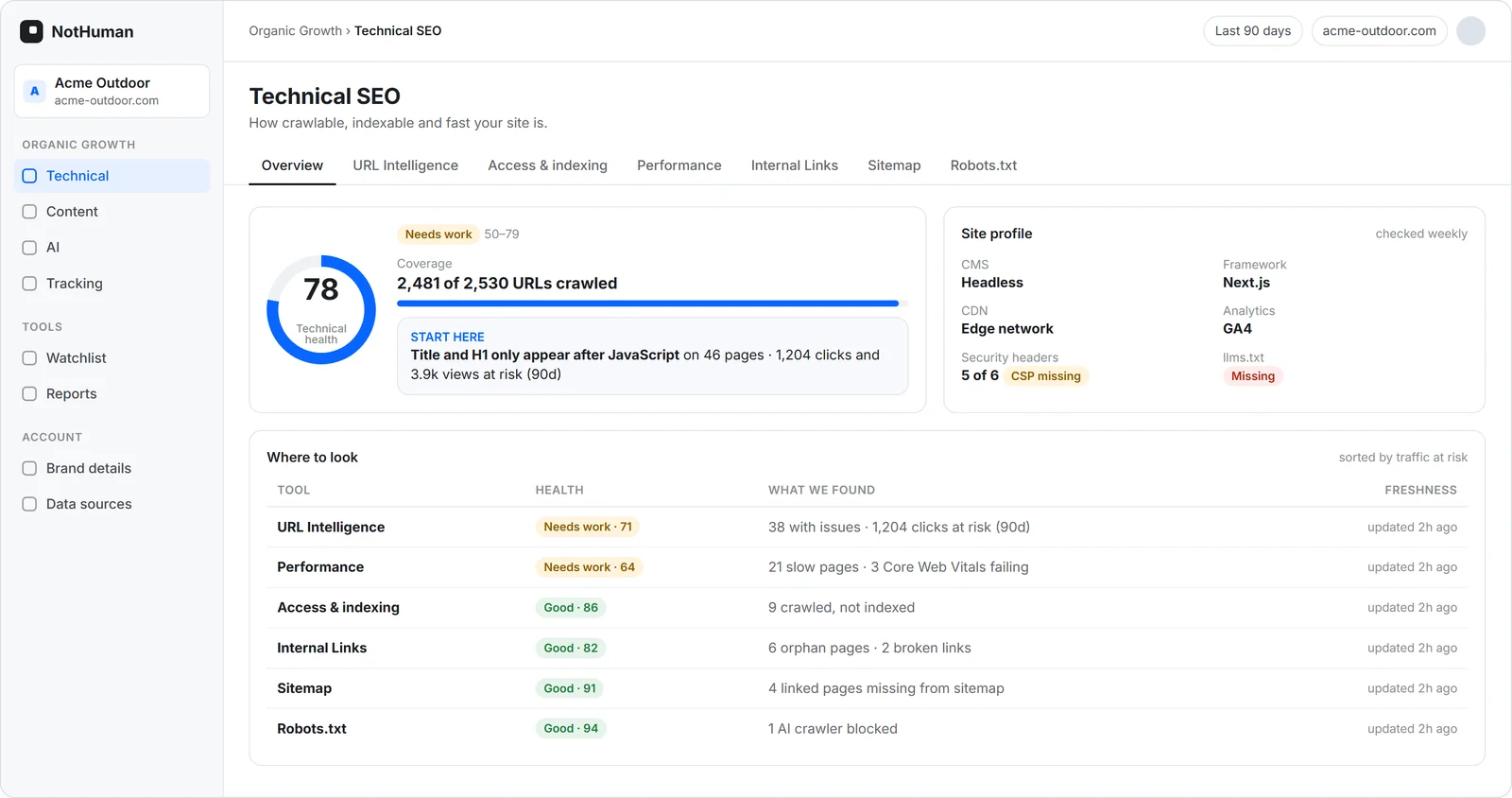
What you’ll find
Every issue comes with the affected pages, the cause and how to fix it.
Availability
4xx and 5xx error pages, redirect chains and loops, broken internal links and traffic landing on dead pages.
Access and indexing
Canonical conflicts with Google, and pages that are crawled but not indexed, missing from the sitemap or blocked by robots.txt.
AI bot access
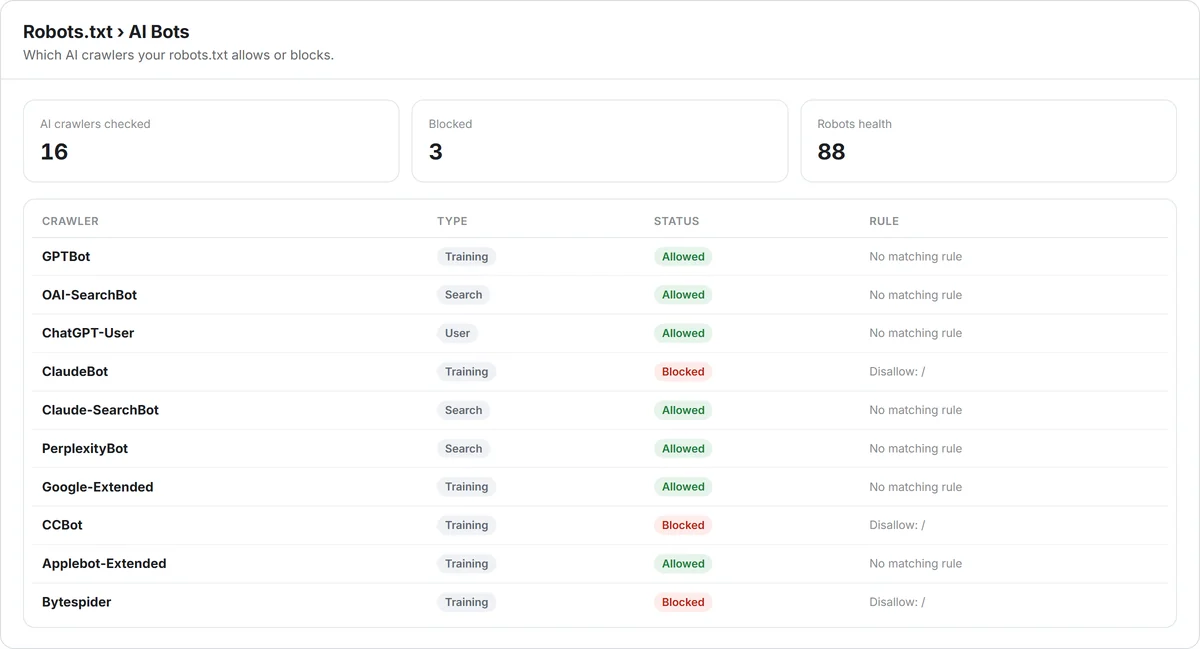
Which of the 16 AI bots your robots.txt allows or blocks, and whether your site has an llms.txt file.
What AI reads without JavaScript
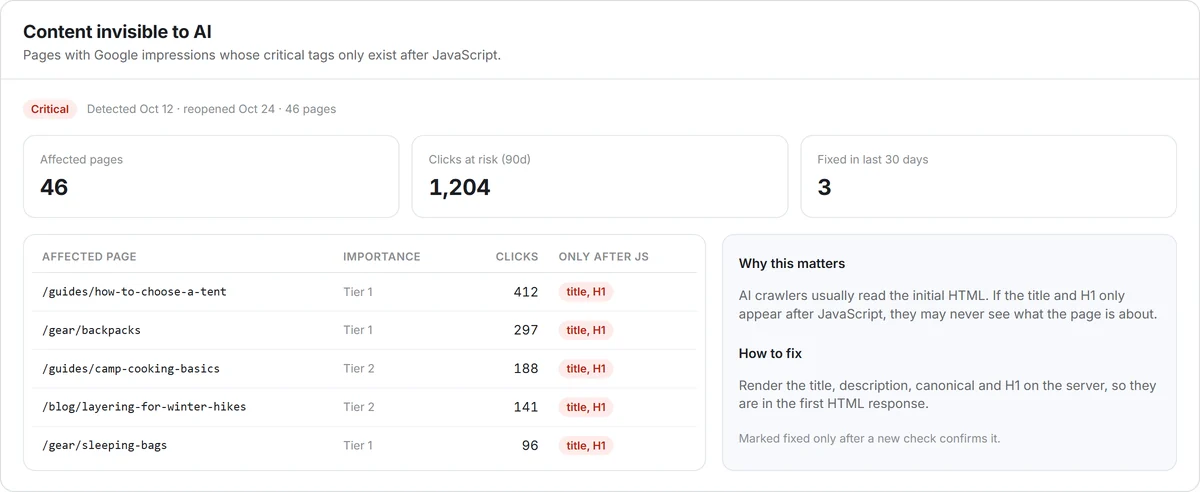
Titles, descriptions, canonicals and H1s that only appear after JavaScript runs, and that an AI bot may not see.
Performance
4 Lighthouse scores and 7 speed metrics, on mobile and desktop, for each page.
Structure and structured data
Orphan or deeply buried pages, thin content, and schema that is missing, invalid or incomplete across 11 types.
From raw data to a list of what to do.
Crawls
Our own crawler reads your site without overloading your server and renders JavaScript when a page needs it.
Combines
Findings are combined with Google Search Console, GA4 and PageSpeed data to show which pages matter.
Prioritizes
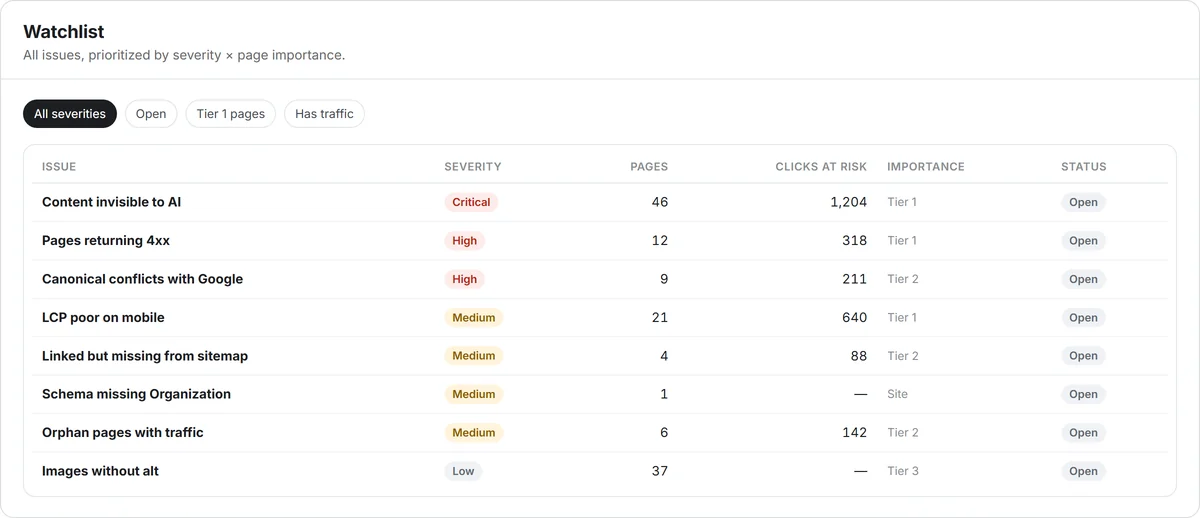
Every issue gets a priority: severity times page importance, with traffic at risk up front.
Monitors
URLs are revisited every day. Whatever changed is crawled again, and an issue is only marked resolved when a new check confirms it.
Start with what costs you traffic.
“Start here” points to the issue with the most clicks and visits at risk over the last 90 days. The Watchlist ranks the rest.
- Priority = severity × page importance
- Flags issues only on pages with an audience, internal links or a place in the sitemap
- Bulk actions, and filters that stay in the URL
See what AI can read.
NotHuman compares the HTML served without JavaScript with the rendered page. When critical tags only exist after JavaScript runs, that becomes a critical issue.
- Raw vs. rendered HTML compared for title, description, canonical and H1
- 16 AI bots classified as training, search or user bots
- robots.txt URL simulator
Every issue comes with evidence.
No generic warnings. Each item shows the affected pages and the evidence in the right format, along with “Why this matters” and “How to fix.”
- What you declare compared with what Google chose
- Issue history: detected, reopened, resolved
- Excel export, plus CSV export per issue
Track every URL, every day.
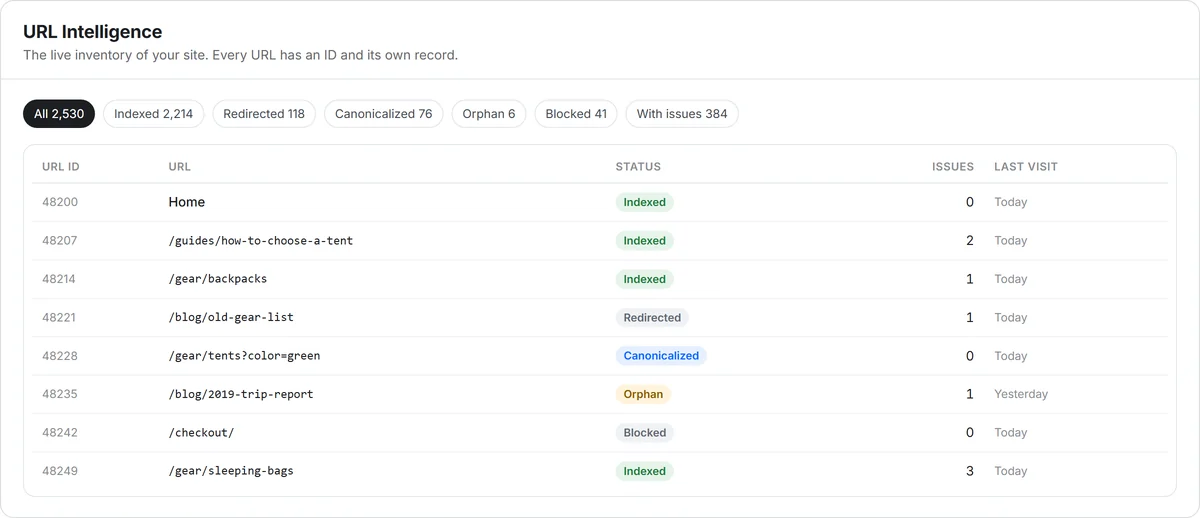
URL Intelligence is a live inventory of your site. Each URL has a unique ID and its own profile, revisited every day and crawled again when it changes.
- Filters for indexed, redirected, canonicalized, orphan, blocked and with issues
- Inventory, tree structure and content views
- URL profile with technical, content and AI citation data
How the score is calculated
Technical health = (1 − average page penalty) × 100Each page is weighted by its worst open issue (critical 1.0 · high 0.6 · medium 0.3 · low 0.15), adjusted for page importance. 80 or above is good; 50 to 79 needs work; below 50 is poor. Snoozing an issue does not improve the score.
The Technical SEO report, ready for every meeting.
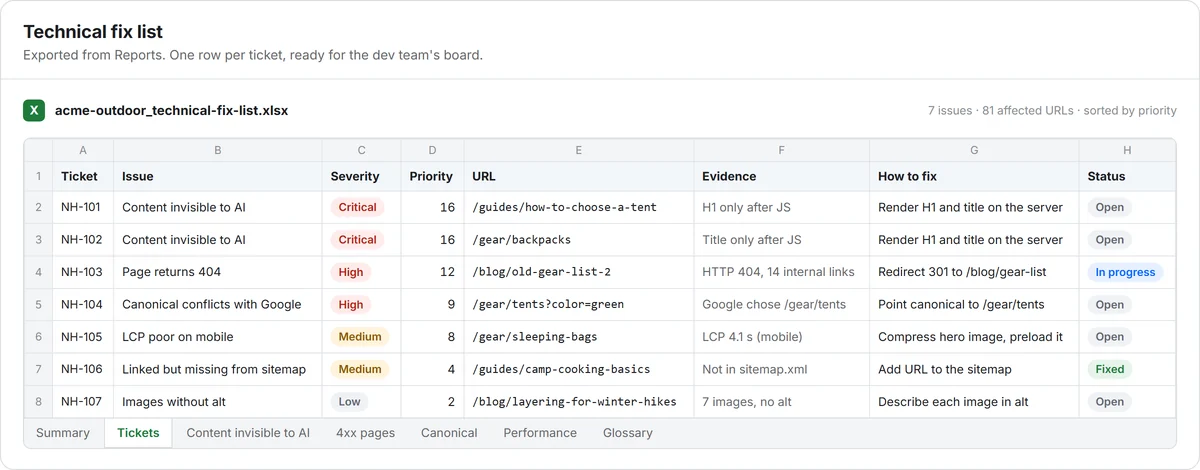
One report, two files generated together: the PDF for the meeting and the Excel with the detail. The period and comparison follow the decision, and the report is sent automatically to whoever you choose.
- Technical health score and trend
- Issues by severity
- Site speed and Core Web Vitals
- One row per ticket
- URL, evidence and how to fix
- One tab per issue
Connected to your site every day
Every day the platform checks your site, starting with the most important pages. If the team fixes something today, the next check already shows the result in the report.
The right period
Weekly tracks the month, quarterly supports planning and seasonal compares the same date across years.
Auto-send
Pick the frequency, day, time and who gets each file. Every send picks up the points from the previous report.
The data shows what is happening. Your specialist helps you decide what to do.
Every plan includes a GEO specialist. They set up the platform with you, deliver the first report after one month with a roadmap, and follow your results in the meetings included in your plan.
Frequently asked questions
Do I need to connect Google Search Console?
To see indexing in Google, yes. Without it, the module keeps crawling and checking your site, and anything that depends on Google shows as “not measured,” never as zero.
Does the crawler handle JavaScript sites?
Yes. It starts with the HTML and uses a browser when a page needs JavaScript. That is how we show the difference between what AI reads without JavaScript and what a person sees.
How often is my site checked?
URLs are revisited every day. When a page changes, it is crawled again and goes through the checks again. Search Console and GA4 data also update daily.
Is there a page limit per plan?
Crawling is not capped by plan. Page ranges are only used to recommend the right plan for the size of your site.
Can I export the issues?
Yes. To Excel, with a site summary and one tab per issue, and to CSV, per issue.
Does the analysis use AI?
No. Every check and score is a fixed, auditable rule. The same page with the same data always gets the same score.
See what NotHuman finds on your site.
Start with the free diagnostic or book a demo with our team.