Reading time: 10 minutes
n8n SEO automation handles repeat work: pulling Google Search Console and GA4 data, building the report and running prompts on AI APIs. That way, you see if the brand shows up. n8n charges per workflow execution and has a free edition for your own server. But the API answer is not the same as the app answer.
In short
- n8n connects Search Console, GA4, spreadsheets and AI APIs in a workflow that runs on its own, on a schedule.
- Brand monitoring uses the official APIs. Scraping the ChatGPT interface breaks the OpenAI terms.
- In an academic study, the sources cited by the API and by the ChatGPT interface overlapped only 12%.
- n8n charges per full workflow execution, while Make and Zapier count each action.
What can you automate in SEO with n8n?
With n8n SEO automation, you can automate anything that follows the same steps: collect data, merge it in a spreadsheet, draft text and alert someone. A workflow starts with a trigger, such as a schedule. Then it moves through nodes, which are the steps. So it suits the monthly report and alerts, but not strategy.
In practice, the most common n8n SEO automation workflows are these:
- Monthly report: pulls Google Search Console and GA4, saves to a spreadsheet and asks AI for a summary draft.
- Drop alert: compares this week with last week and sends a Slack or Gmail message when a number falls.
- AI monitoring: runs the same prompts on the OpenAI and Perplexity APIs and logs whether the brand appeared.
The Schedule Trigger node sets the schedule. According to the docs, it runs every set number of weeks, on the day and time you pick. For example, every Monday at 8 a.m. Google Analytics, in turn, has its own node, with a report operation. Finally, the traffic that AI tools send to the site shows up in a separate channel, explained in the guide to AI traffic in GA4.
How do you connect Google Search Console to n8n?
n8n has no Google Search Console node, so the connection goes through the HTTP Request node. In addition, the scope list of the generic Google credential in n8n does not include the Search Console scope. A scope outside that list does not work. So, combining the n8n docs and the Google docs, the likely path is the generic OAuth2 credential of the HTTP Request node, with the Search Console read-only scope. We have not tested this combination, so run a test before you build the client workflow.
With the credential ready, the n8n workflow with Google Search Console calls the searchAnalytics.query method. It returns clicks, impressions, CTR and position. Each request returns up to 25,000 rows, and the default is 1,000. However, Google warns that the API returns the top rows, not all of them. The Search Console API is free, with usage limits per site, per user and per project.
What the Search Console report shows, and does not show, about AI Mode is in the guide to Search Console and AI.

How do you build an n8n workflow that tracks the brand in ChatGPT and Perplexity?
Build the workflow with the official APIs: the schedule fires, n8n reads the prompt list, asks each engine and saves the result. After all, the OpenAI Terms of Use forbid extracting data or output from its services automatically. In other words, a bot that types into ChatGPT breaks the rules.
For OpenAI, the n8n node generates answers through the Responses API and has web search as a built-in tool. For Perplexity, n8n has a node that sends a message to a model. However, the node docs do not say which API it calls. In September 2026, Perplexity ended support for Sonar Chat Completions and began recommending the Agent API. Therefore, check the node first, or call the Agent API through the HTTP Request node.
Which n8n nodes go into the SEO and GEO workflow?
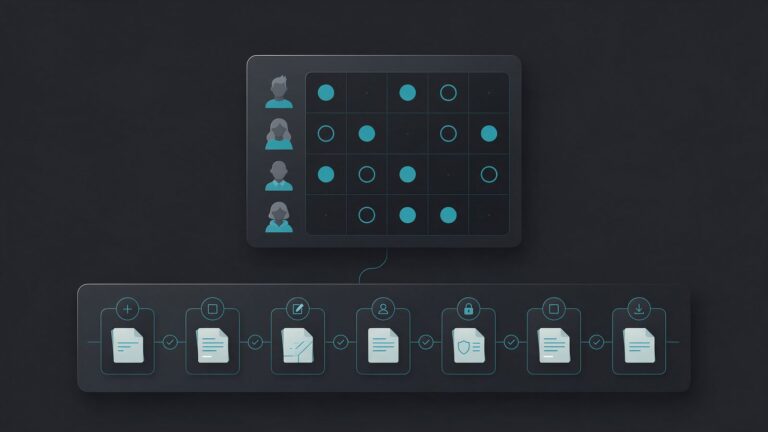
In n8n, the SEO and GEO monitoring workflow looks like this, node by node. We built this list from the docs only, without running the workflow:
- Schedule Trigger: every Monday at 8 a.m.
- Google Sheets: reads the prompt list, with client, brand and competitors.
- Loop Over Items and Wait: send one prompt at a time, with a pause between requests.
- OpenAI, with web search: asks the model and gets the text and the cited sources.
- Perplexity or HTTP Request: asks Perplexity the same question.
- Code: flags whether the brand and competitors appeared and pulls out the cited domains.
- Google Sheets: saves the date, engine, prompt, full answer and flags.
- IF and Slack: alert the team when brand presence falls compared with the previous week.
Keep the full answer, not just “yes” or “no”. Otherwise, nobody can check the flag later. The metrics and the sample size follow the protocol for measuring brand mentions and citations, which calls for about 1,000 answers per client per month.
Is the API answer the same as the app answer?
No. The API uses the model and the search you configure, without the memory, plan and user context of the app. In an audit by universities in the Netherlands and Switzerland, with data collected in the Netherlands, the domains cited by the API and the interface overlapped 12% on average in ChatGPT. For Gemini, the overlap was 14.8%.
In other words, an n8n SEO automation workflow measures brand presence in the API. That is a close picture of what consumers see, but not the same one. According to the OpenAI web search docs, the API offers web search as a tool in the Responses API and, in some cases, through Chat Completions search models. Even so, nothing guarantees the same answer as the app, since the study measured very different sources between the API and the interface.
On the other hand, the API returns data the app does not show. For example, the sources field lists every page the model consulted, not just the cited ones. In addition, search accepts an approximate location, with the country set as a two-letter code, such as “US” for the United States. So use the workflow to see the trend week by week, not to prove what a client saw on their phone.
When collection needs to match the consumer’s screen, the decision is different. The comparison of GEO tools shows which tools collect from the interface and when building your own collection pays off. Likewise, the guide to how ChatGPT works explains why memory and search change the answer. Before you compare weeks, learn why the same question gets different answers.
How much does n8n SEO automation cost, with the APIs?
n8n SEO automation can cost nothing in license fees if you host the Community edition. Otherwise, it costs 20 euros per month on the cloud Starter plan, billed annually (the pricing page lists euros only). On top of that, AI APIs charge per call and per token. The Google Search Console API, however, is free, and the GA4 API has quotas per property.
On the n8n pricing page, Starter includes 2,500 executions per month. Pro, at 50 euros per month billed annually, includes 10,000. Each execution is one run of the full workflow, however many steps it has. So the Monday workflow uses about four executions per month per client, even with 30 prompts. However, on Starter each execution can last at most 5 minutes, and on Pro, 40. Therefore, long pauses between prompts can hit the Starter limit. Without a license, by the way, the self-hosted version runs as Community, but the server and upkeep are on you.
| Item | Published price |
|---|---|
| n8n Community | Free, on your server |
| n8n Starter (cloud) | 20 euros/month billed annually |
| OpenAI web search | $10 per 1,000 calls, plus tokens |
| Perplexity web search | $2.50 per 1,000 calls, plus tokens |
| Search Console API | Free, with limits |
How much does search cost on the AI APIs?
Run the numbers for the example of 30 prompts per week on two engines. That comes to about 120 calls per month on each one, if each prompt runs a single search. On the OpenAI price list, that is $1.20 in search fees, and on Perplexity, $0.30. If the model searches more than once per prompt, the fee rises in the same proportion. Also, the tokens from the pages that search reads are billed separately, at the model rate. So run a test week and check the real spend on the usage dashboard.
n8n, Make or Zapier: which one should you pick for SEO?
For SEO and GEO, n8n pays off when the workflow has many steps or many prompts, because it charges per full execution. Make and Zapier, on the other hand, count each action. They are simpler for people who don’t want to deal with APIs and credentials. So the choice depends on volume and on who will maintain the workflow.
| Tool | How it charges | Free plan |
|---|---|---|
| n8n | Full workflow execution | Community, on your server |
| Make | Credits per module action | 1,000 credits per month |
| Zapier | Task per successful action | 100 tasks, two-step Zaps |
In Zapier, each successful action counts as one task, while triggers and filters do not count. In Make, each time a module performs an action, it uses credits. As a result, 30 prompts on two engines, with one save per answer, add up to about 120 actions per run. Under the published rule, that is about 480 actions per month. This is well above the Zapier free plan, which also lacks multi-step Zaps.
For this reason, the rule of thumb is this:
- n8n: many prompts, several clients and someone on the team who knows APIs.
- Make: mid-size workflows, with a visual editor and no server of your own.
- Zapier: simple links between apps, such as sending a form to a spreadsheet.
To compare n8n with chat tools, Claude Code and agents, see the guide to AI for SEO and GEO. If the task changes with every request and depends on files, the guide to Claude Code for SEO and GEO shows the other path.
What should you check before an n8n SEO automation workflow goes live?
Before you connect an n8n SEO automation workflow to client data, cover three fronts: API limits, usage rules and human review. A workflow that runs on its own also fails on its own. That is why someone needs to read the spreadsheet before the number reaches the client.
- Limits: the n8n docs on rate limits suggest the Retry On Fail setting or the Loop Over Items and Wait pair. With them, the workflow spaces out requests and avoids the 429 error.
- Citations: OpenAI requires citations to be clearly visible and clickable when search results are shown to end users. For example, this applies to the report that goes to the client.
- Credentials: use one credential per client, read-only, such as the Google Search Console read-only scope.
- Dates and versions: record the date and model of each run, because the model changes and the answer changes with it.
- Review: leave the AI draft for an analyst to review. After all, a drop may come from a workflow error, not from the brand.
n8n also offers human approval before an agent uses a tool. Even so, for a monthly report, the simplest review is to read the spreadsheet before you send it.
Main sources
- n8n, plans and pricing (2026).
- n8n Docs, generic Google OAuth2 credential and supported scopes (2026).
- Google for Developers, searchAnalytics.query method of the Search Console API (2026).
- OpenAI, API web search guide (2026).
- OpenAI, API pricing (2026).
- OpenAI, Terms of Use (2026).
- Uberti-Bona Marin et al., audit of AI-generated product recommendations, arXiv (2026).
- Perplexity, migration from Sonar to the Agent API (2026).